
There are already plenty of AI apps that can answer questions, summarize text, or help write an email.
Meta Muse for Mac is trying to do something different.
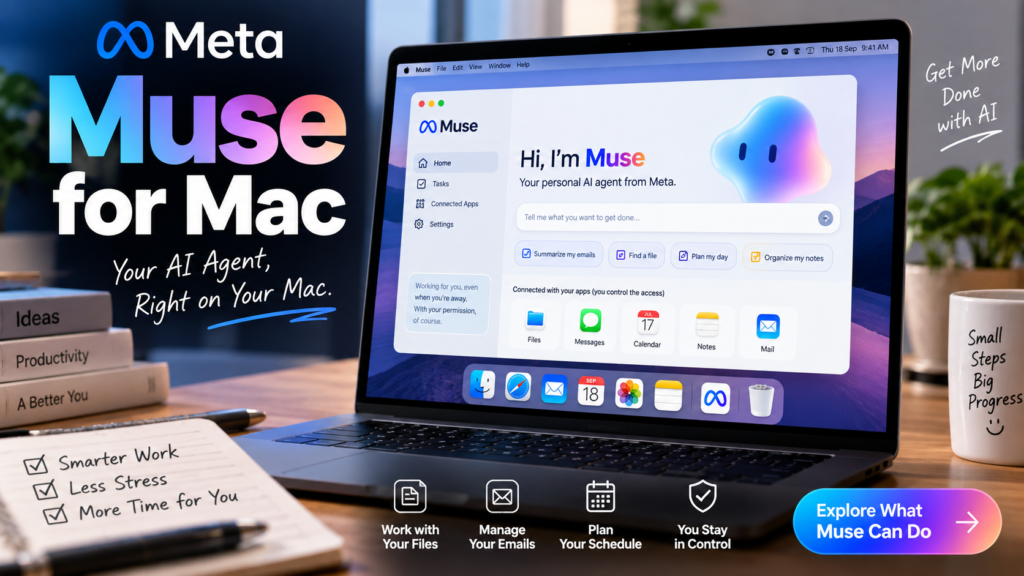
Instead of staying inside a chat window, Muse can work with things already on your Mac—such as files, Messages, Calendar, Notes, and Mail—and help complete tasks using those apps. The Mac version became available on September 18, following Muse’s earlier launch on mobile and the web.
That difference is what makes this launch interesting.
If you are wondering whether Muse is simply another chatbot, how much access it needs, whether it is safe to connect to personal apps, or whether it is even worth installing, here is the practical version.
What Is Meta Muse?
Muse is Meta’s new personal AI agent.
A normal chatbot mostly waits for you to ask something and then gives you an answer. Muse is designed to go a step further: you can give it a task or goal, and it can perform actions on your behalf.
Meta says Muse can handle tasks such as sending emails, filling out forms, researching information, planning projects, booking travel, and helping with longer-running goals. It can continue working even after you leave the app and come back when it needs your approval.
That is why the word “agent” matters here.
The idea is not only:
“Tell me how to do this.”
It is closer to:
“Help me get this done.”
What Changes With Meta Muse for Mac?
The Mac version makes Muse more useful for desktop work because it can interact with native Mac apps and local information that you choose to make available.
According to reporting on the launch, Meta Muse for Mac can work with files, Messages, Calendar, Notes, and Mail. Access is opt-in, meaning you decide what Muse is allowed to use.
That opens up some practical possibilities.
For example, instead of manually searching through your Downloads folder for a file you vaguely remember, you could ask Muse to help locate it.
Or, instead of switching between Mail and Calendar while trying to schedule something, Muse could potentially use information from both—assuming you have given it the necessary permissions.
This is the part that feels more useful to me than simply adding another AI chat app to the Dock.
How to Download Meta Muse for Mac
Meta now has an official Muse download page for Mac and mobile devices.
The safest approach is to download Muse only from Meta’s official website rather than using third-party download sites.
After installing it, sign in with the account requested by Muse and go through the initial setup.
You should not feel pressured to connect everything immediately.
Start with only the apps you actually want Muse to help with. If you mainly want help organizing files, for example, there is little reason to give it access to Mail on day one.
That is probably the most sensible way to test an AI agent like this.
How to Start Using Meta Muse on a Mac
Once the app is installed, using Muse should feel fairly familiar if you have used ChatGPT, Meta AI, Gemini, or another AI assistant.
The big difference comes when Muse needs access to another app or needs to perform an action.
You might ask things such as:
“Find the PDF I downloaded last week about my flight.”
“Check my calendar and help me find a free time tomorrow afternoon.”
“Summarize the important emails I received today.”
“Organize the files in my Downloads folder.”
Muse can then use the services and apps you have allowed it to access.
For sensitive actions, Meta says Muse asks for approval before proceeding.
That distinction is important because an AI that can read information is one thing; an AI that can send, purchase, delete, or change something needs a much higher level of control.
What Can Meta Muse Actually Do?
Muse is designed around tasks rather than just questions.
Meta’s examples include handling emails, browsing the web, filling out forms, helping arrange travel, shopping, planning projects and working on goals that may take longer than a single conversation.
On Mac, its access to native apps makes some of those tasks more practical.
Imagine you are preparing for a trip.
Instead of separately searching your email for the booking confirmation, checking Calendar for your dates, searching files for an itinerary and opening a browser for another reservation, an agent could potentially coordinate information across those places.
That is the promise.
The important word is potentially, because AI agents can still misunderstand instructions or make mistakes. I would not give any AI agent unlimited control over important accounts and assume it will always do the right thing.
Does Muse Work in the Background?
Yes, and this is one of the bigger differences between Muse and a traditional chatbot.
Meta says Muse can continue working on longer tasks after you close the app. It can return when something changes or when it reaches a step that needs your approval.
That could be useful for things such as research, shopping comparisons or tasks involving multiple steps.
Instead of sitting in front of the chat waiting for every step to complete, you can hand over the task and come back later.
For an AI assistant, that is much closer to how people would actually want automation to work.
The Big Question: What About Privacy?
This is probably the section I would read before connecting Mail, Messages, files or payment-related services.
Muse needs access to personal information to become genuinely useful. At the same time, giving an AI access to that information naturally creates privacy and security questions.
Meta says Muse runs inside a dedicated Muse Secure VM, essentially a separate cloud-based environment that contains the agent and connected data. Meta also says a separate security system called Sentinel checks actions before they reach the internet.
According to Meta, Muse does not directly see stored passwords or payment credentials. Those credentials are kept in secure storage and can be used when necessary without being exposed directly to the agent.
Meta also says users can decide which services Muse connects to and how much access each connection receives.
For example, access to an email account does not necessarily have to mean permission to send email.
You may be able to allow reading without allowing sending.
That kind of granular permission control is exactly what I would look for before connecting anything important.
Does Muse Ask Before Sending Emails or Making Purchases?
Meta says yes.
Sensitive actions such as sending an email or making a purchase require user approval, and Muse provides an audit trail showing actions it has taken or plans to take.
That does not mean you should stop checking what the agent is doing.
I would still read the confirmation screen carefully.
If Muse drafts an email for you, review it before approving the send.
If it is buying something, check the product, price, delivery address and total before confirming.
AI agents may save time, but the final responsibility is still yours.
Does Meta Use Muse Conversations for Ads?
Meta says Muse conversations and the data stored in a user’s Muse Secure VM are not shared with Meta’s advertising systems. It also says users can opt out of having their Muse interactions used to train Meta’s AI models.
That is an important distinction given how much personal context an AI agent may eventually collect.
Still, privacy settings can change as products evolve, so I would periodically review connected apps and account settings rather than treating the setup screen as something you only look at once.
Can You Remove Access Later?
Yes.
Meta says users can change permissions or disconnect services whenever they want. Muse also remembers information about the user, but Meta says you can ask it to forget specific things it has learned.
That is useful if you test an integration and later decide you are not comfortable keeping it connected.
My approach would be simple:
Give Muse the minimum access needed for the task you actually want it to perform.
If you later find a feature useful, add more access gradually.
Is Meta Muse Free?
Meta says Muse is free for most everyday use, with subscription options available for people who need more.
The exact value of a paid plan will depend on how heavily someone uses the agent and which advanced capabilities are included.
For casual users, I would start with the free experience first.
There is little reason to pay immediately until you know whether an AI agent actually saves you enough time to justify a subscription.
Where Is Meta Muse Available?
Muse initially rolled out in the United States on iOS, Android and the web. Meta has now expanded it to Mac as well.
If you are outside the U.S. and cannot access the service yet, that may simply be an availability issue rather than a problem with your account or device.
Meta is also planning to bring Muse to AI glasses.
Is Meta Muse the Same as Meta AI?
They are related, but Muse is positioned more specifically as a personal agent.
Meta AI already gained more agent-like abilities earlier in 2026, including planning, connecting to email and calendars, creating slides and handling tasks. Muse takes that direction further with a dedicated personal-agent experience, persistent context and longer-running tasks.
So the easiest way to think about it is:
Meta AI can help you.
Muse is designed to work for you.
Whether it does that reliably enough in everyday use is what will matter more than the branding.
Should You Install Meta Muse on Your Mac?
If you regularly work across email, calendars, notes and files, Muse is worth watching.
The Mac version makes more sense than a standalone mobile AI app because desktop users often deal with exactly the kind of multi-step tasks agents are supposed to reduce.
But I would not connect every account on the first day.
Start small.
Let it help with something low-risk, such as finding files, summarizing information or organizing a simple task.
Then see whether it actually saves time.
If it does, expand from there.
If it does not, you have not handed over unnecessary access to your digital life.
Quick Privacy Checklist Before Connecting Your Accounts
Before giving Muse access to personal services, I would check these five things:
- Connect only the apps you genuinely need.
- Review whether Muse has read-only or action permissions.
- Check every sensitive action before approving it.
- Periodically review and remove unused connections.
- Avoid treating AI output as automatically correct, especially for payments, emails or important documents.
That approach gives you the benefits of automation without unnecessarily giving the agent control over everything at once.
Meta Muse for Mac: Useful Upgrade or Just AI Hype?
It is too early to know whether Muse will become an everyday tool for most Mac users.
But the Mac launch is more interesting than another chatbot release because Muse is moving AI closer to the apps and information people actually use throughout the day.
The ability to work with Mail, Calendar, Messages, Notes and files could save real time if the agent proves reliable.
At the same time, those integrations are exactly why privacy and permission controls matter.
The best AI agent is not necessarily the one that can access the most information.
It is the one that can complete useful work while keeping the user clearly in control.
That is the standard Muse will ultimately have to meet.
Final Thoughts
Meta Muse for Mac is a good example of where consumer AI appears to be heading.
Instead of asking an AI a question, users are increasingly being asked to trust AI with actual tasks.
Muse can work with Mac apps, continue longer jobs in the background, remember useful context and request approval before sensitive actions. Meta has also built dedicated security controls around the agent, including its Secure VM and Sentinel system.
For now, I would treat Muse as something to test gradually rather than an assistant that immediately gets access to your entire digital life.
Install it, connect one or two low-risk services, give it a real task and see whether it genuinely saves you time.
That will tell you more than any feature list.
Frequently Asked Questions
What is Meta Muse for Mac?
Meta Muse is a personal AI agent that can help complete tasks and, on Mac, can interact with apps such as Files, Messages, Calendar, Notes and Mail when the user gives permission.
Is Meta Muse available on Mac?
Yes. Meta Muse became available on Mac on September 18, 2026, following its earlier launch on mobile and the web.
Is Meta Muse free?
Meta says Muse is free for most everyday needs, while subscription plans are available for people who want additional usage or capabilities.
Can Meta Muse access my emails and files?
It can access supported services only when you grant permission. On Mac, Muse can work with files, messages, calendar, notes and mail. Meta says users decide which services are connected and what level of access they receive.
Does Muse ask before sending an email or making a purchase?
Meta says Muse asks for approval before sensitive actions such as sending email or completing a purchase.
Does Meta use Muse conversations for advertising?
Meta says conversations with Muse and data inside the Muse Secure VM are not shared with Meta’s advertising systems.
Is Meta Muse available in India?
Muse’s initial rollout is currently focused on the United States. If it is not available in your region yet, you may need to wait for Meta to expand availability.
Official Sources
Meta — Download Muse for Mac & Mobile
Meta AI Research — How We Built Safety Into Muse
Last Updated: September 18, 2026