Talking to an AI assistant is useful, but it still often feels like this:
You speak.
You wait.
The AI thinks.
Then it answers.
Google is trying to make that experience feel much more natural with Gemini 3.8 Live.
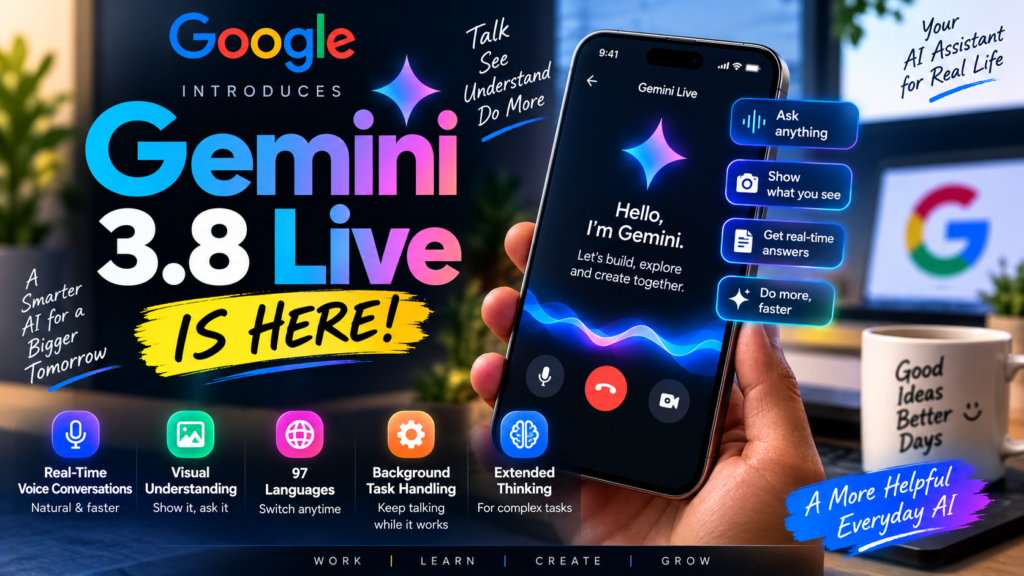
The company has introduced two new live voice models — Gemini 3.8 Live and Gemini 3.8 Live Extended Thinking — designed for real-time conversations, visual understanding and tasks that continue running while you are still talking.
This is not simply another chatbot update.
The bigger idea is to make Gemini feel less like a tool where you send one prompt at a time and more like an assistant you can actually have an ongoing conversation with.
Google says the new models are its most advanced live-dialogue models so far.
What Is Gemini 3.8 Live?
Gemini 3.8 Live is Google’s latest model built specifically for fast, real-time voice interaction.
Instead of focusing only on text prompts, it can work with voice, images and video while maintaining a live conversation.
For example, imagine pointing your phone camera at something that is not working and asking:
“Why is this error showing?”
Gemini can use what it sees along with what you are saying to understand the situation and respond in real time.
That combination of voice and visual context is one of the most interesting parts of the update.
According to Google’s developer documentation, Gemini 3.8 Live accepts text, images, audio and video as input and can generate text and audio responses.
Gemini 3.8 Live vs Extended Thinking
This part can be confusing because Google launched two models with very similar names.
The difference is actually quite simple.
Gemini 3.8 Live
This version is designed for speed and natural conversation.
It is useful when you want quick responses without long pauses.
Think of situations like:
- Asking questions while showing something through your camera
- Getting step-by-step troubleshooting help
- Voice assistants
- Customer-support conversations
- Simple everyday tasks
Gemini 3.8 Live Extended Thinking
Extended Thinking is designed for tasks where the AI needs to do more reasoning before reaching an answer.
For example, you might ask Gemini to:
- Compare several pieces of information
- Plan a complicated task
- Work through multiple steps
- Use different tools in the background
- Complete a longer workflow
The interesting part is that Gemini does not necessarily have to become silent while doing this.
Google says Extended Thinking can reason in the background while continuing the conversation and giving progress updates.
That may sound like a small change, but in real use it could make AI conversations feel much less awkward.
Conversations Should Feel More Natural
One problem with voice assistants has always been timing.
Sometimes they interrupt too quickly. Sometimes they take too long to respond. And if the task is complicated, the conversation can completely stop while the system processes it.
Gemini 3.8 Live is designed to reduce that problem.
Google says the model can continue speaking while API calls and tools run in the background.
So, instead of waiting silently, the assistant can acknowledge your request and continue the conversation while the task finishes.
That sounds much closer to how people actually communicate.
If you ask another person to check something complicated, they usually don’t freeze for 20 seconds. They may say:
“Okay, I’m checking that.”
That is the type of conversational behaviour Google is trying to create here.
It Can Understand What You Show It
Another major feature is visual context.
Gemini 3.8 Live can process visual input in near real time.
That means you can potentially use your camera or screen while talking to Gemini and ask questions about what it sees.
There are many practical situations where this can be useful.
Suppose your laptop is showing an error message.
Instead of manually typing the entire error, you could show the screen and ask Gemini what it means.
Or imagine assembling a product and getting stuck on one step.
You could show the object through the camera and ask what you should do next.
For most users, this may end up being more useful than another small improvement in text generation.
Gemini 3.8 Live Supports 97 Languages
One feature that could matter a lot outside the US is multilingual support.
Google says Gemini 3.8 Live can automatically detect and move between 97 supported languages during the same conversation.
This means a user could begin speaking in English and switch to another supported language without necessarily restarting the conversation.
For multilingual users, especially in countries like India, that could make voice interaction much more practical.
Many people naturally mix languages while speaking.
Real conversations do not always stay in one perfectly structured language, so better language switching is a meaningful improvement.
Background Tasks Are a Bigger Deal Than They Sound
The feature I find more interesting is not the voice itself.
It is what Gemini can do while the conversation continues.
Gemini 3.8 Live supports asynchronous function calling.
In simple words, it can start a task using a connected tool or service without stopping the entire conversation.
Google gives examples involving multi-step workflows and connected services.
This could eventually make AI assistants more useful for things such as planning, finding information, managing work and completing actions instead of simply answering questions.
For developers, this also makes it easier to build voice assistants that actually do something in the background rather than only talking to users.
Where Is Gemini 3.8 Live Available?
Google is rolling out the two models across different products.
Gemini 3.8 Live is available for developers through the Gemini API and Google AI Studio.
Google is also using it in Search Live.
The more powerful Gemini 3.8 Live Extended Thinking is also available through the Gemini API and AI Studio.
For consumers, Google says Extended Thinking is rolling out in Gemini Live, while Google AI subscribers can access it through supported Workspace experiences such as Docs, Gmail and Keep depending on the product and subscription.
Because Google is rolling these features out gradually, everyone may not see the same options immediately.
Your country, Google account, app version and subscription can affect availability.
How to Use Gemini 3.8 Live
For normal users, the easiest way is through the Gemini experience where Live features are available.
Open the Gemini app and look for the Gemini Live option.
Start a voice conversation as you normally would.
If the latest model has reached your account, Gemini will use the updated Live experience where supported.
For Search users, Google’s new model is also powering Search Live, which can provide real-time conversational help for supported users.
Developers have a different route.
They can open Google AI Studio or use the Gemini Live API and select the gemini-3.8-live model.
Google describes Gemini 3.8 Live as the default option for many low-latency voice-agent experiences.
What Developers Get
For developers, this release is actually quite important.
Gemini 3.8 Live supports features such as:
- Real-time audio conversations
- Visual context
- Asynchronous function calling
- Search grounding
- Multilingual interaction
- Continuous client-content updates
The model supports a context window of up to 131,072 input tokens according to Google’s current API documentation.
There is also a separate Extended Thinking model for applications that need more reasoning.
This means companies could use the technology for things like customer service, training assistants, voice interfaces and other conversational products.
Can Gemini 3.8 Live See Through Your Camera?
It can process visual input when the relevant Gemini experience gives it access to that input.
That does not mean Gemini is permanently watching through your camera.
You still need to provide or share the visual information through a supported experience.
The important part is that once visual information is available, the model can combine what it sees with what you are saying.
That makes the conversation more contextual.
Instead of explaining everything with words, you can sometimes simply show the problem.
What About Privacy?
Voice and camera-based AI naturally raise privacy questions.
Users should be careful about what they share with any AI assistant, especially personal documents, passwords, financial information, private conversations or sensitive work data.
Google also says audio generated by its AI products includes SynthID watermarking, an imperceptible watermark designed to help identify AI-generated content.
Even with new AI features, the basic rule should stay the same:
Do not share information with an AI service that you would not be comfortable sending to an online platform.
Gemini 3.8 Live vs Normal Gemini Chat
The easiest way to understand the difference is this:
Traditional Gemini is mainly based around a prompt-and-response workflow.
You type or speak something, Gemini responds, and then you continue.
Gemini 3.8 Live is designed around a more continuous interaction.
It can combine:
Voice + Visual Context + Tools + Background Tasks
That is what makes it different.
The goal is not simply to produce a smarter answer.
The goal is to create a smoother conversation while useful work is happening at the same time.
Is Gemini 3.8 Live Free?
There is no single answer for every Gemini 3.8 Live feature.
Google is making Gemini 3.8 Live available in Search Live for supported users, while some Extended Thinking features are connected to Google AI subscription plans and Workspace experiences.
Developers using the API are charged according to Google’s Gemini API pricing.
So the exact cost depends on where and how you are using the technology.
Why This Update Matters
We have already reached a point where AI can write emails, summarize documents and answer complicated questions.
But voice assistants still often feel slower and less natural than simply talking to another person.
Gemini 3.8 Live is Google’s attempt to close that gap.
What makes the update interesting is not one headline feature.
It is the combination of:
faster conversations, visual understanding, multilingual support, background tool use and deeper reasoning.
If these features work reliably in everyday situations, talking to an AI assistant may start becoming useful for more than simple questions.
It could become a practical way to actually get tasks done.
Final Thoughts
Gemini 3.8 Live looks like a meaningful update for Google’s voice AI strategy.
The standard model focuses on fast, fluid conversations, while Extended Thinking adds more reasoning for complicated tasks.
For everyday users, the biggest improvements are likely to be better voice interaction, visual understanding and the ability to keep talking while Gemini works on something in the background.
For developers, the bigger story is the Live API.
It gives businesses and app developers the tools to build much more capable voice assistants without creating the entire voice-processing system themselves.
The rollout is still developing, so availability may vary between users and regions.
But the direction is clear.
AI assistants are moving away from simple text boxes and closer to continuous, multimodal conversations.
And Gemini 3.8 Live is one of Google’s biggest steps in that direction so far.
Frequently Asked Questions
What is Gemini 3.8 Live?
Gemini 3.8 Live is Google’s real-time multimodal AI model designed for fast voice conversations, visual understanding and background tool use.
When was Gemini 3.8 Live launched?
Google announced Gemini 3.8 Live and Gemini 3.8 Live Extended Thinking on September 15, 2026.
How many languages does Gemini 3.8 Live support?
Google says the model supports automatic switching across 97 languages during conversations.
What is Gemini 3.8 Live Extended Thinking?
It is the higher-reasoning version designed for complex, multi-step tasks while maintaining an ongoing voice conversation.
Can Gemini 3.8 Live understand images and video?
Yes. Google’s API documentation lists text, images, audio and video as supported input types.
Can I use Gemini 3.8 Live in the Gemini app?
Google says Gemini 3.8 Live Extended Thinking is rolling out through Gemini Live, while the standard 3.8 Live model is also being used in Search Live. Availability can vary by account, region and product.
Is Gemini 3.8 Live available for developers?
Yes. Both Gemini 3.8 Live models are available through the Gemini API and Google AI Studio.
Disclaimer
This article is for informational and educational purposes only. Features, pricing, availability and subscription requirements may change as Google continues rolling out Gemini updates. Always check Google’s official documentation for the latest information.
Official Sources
- Google Official Announcement: Gemini 3.8 Live and Gemini 3.8 Live Extended Thinking
- Google AI for Developers: Gemini 3.8 Live Documentation
- Google Developers Announcement: New Gemini Audio Models
Last Updated: September 19, 2026