Android users have waited a long time for a proper Adobe Premiere app built for mobile editing.
That wait is finally over.
Adobe officially released Premiere for Android on September 22, 2026, bringing its mobile video editor to Android phones and tablets after first launching the mobile experience on iPhone. The app is available for free through the Google Play Store.
The interesting part is that this is not simply a basic clip cutter carrying the Premiere name.
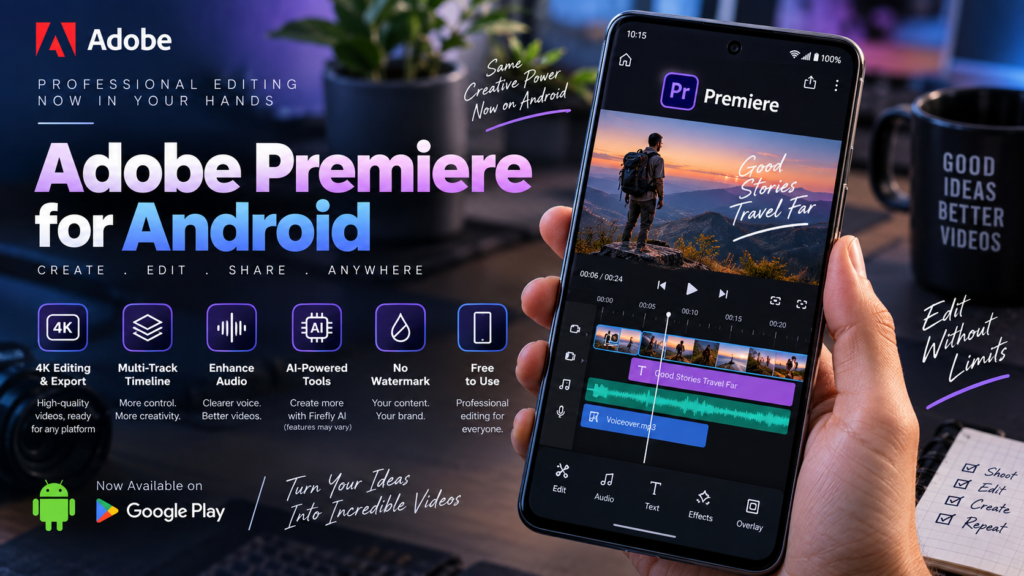
Adobe has included a multi-track timeline, frame-accurate trimming, Enhance Audio, templates, effects, stock assets and video export up to 4K. The free app also does not add a watermark to exported videos.
For people editing Reels, Shorts, tutorials or everyday videos directly on a phone, that makes Premiere on Android worth a closer look.
Here is what it can actually do, which phones can run it and where Adobe still has a few limitations.
Adobe Premiere Is Finally Available on Android
Adobe Premiere for Android is now available through the Google Play Store.
Adobe describes it as a standalone mobile editing app rather than a stripped-down remote version of desktop Premiere. You can start a project, import clips from your phone, edit them and export the finished video directly from the mobile app.
You also do not need an Adobe account just to start editing.
According to Adobe, users can:
- edit videos
- save projects locally
- export videos
without signing in.
An account becomes necessary for some connected services, including certain Stock assets and generative AI features.
That is a welcome decision because it means someone can download the app and test the core editor before creating another account.
Is Adobe Premiere for Android Free?
Yes.
The core Premiere Android app is free to use.
Adobe says the free version includes the main video editing tools and allows unlimited 4K exports without watermarks.
There are paid elements, but they are not required for normal editing.
Adobe charges when users need things such as:
- additional cloud storage
- additional generative AI credits
That distinction matters.
“Free” sometimes means an app lets you edit but then locks high-resolution export or watermark removal behind a subscription.
That is not how Adobe is positioning Premiere mobile.
No Watermark on Export
This may be one of the biggest reasons creators try the app.
Adobe says Premiere mobile provides a watermark-free editing and export experience.
You can export videos without having a Premiere logo placed over the finished video.
For creators posting content professionally, that is much more useful than having to crop around a watermark or pay simply to remove branding.
4K Editing and Export Are Supported
Premiere mobile supports editing and exporting videos at up to 4K resolution.
That makes the app suitable for more than casual low-resolution clips.
Modern Android phones can already record strong 4K video, so being able to keep that resolution through the editing process makes sense.
Of course, 4K editing is heavier than editing a 1080p clip.
Even if a phone technically meets Adobe’s minimum requirements, performance will still depend on:
- processor performance
- available RAM
- free storage
- video length
- number of tracks
- effects being used
- source video resolution
So a phone meeting the minimum requirement does not automatically mean a complicated 4K project will feel as smooth as it would on a flagship device.
Adobe Premiere Android Requirements
Adobe has published clear minimum requirements for the Android version.
You need:
Android 13 or later
and at least:
5GB RAM
Adobe supports both Android phones and Android tablets.
The company also says some online features require an internet connection.
For access to creative asset libraries, cloud-based functionality and generative AI features, Adobe recommends at least 4G connectivity, with 5G recommended. Wi-Fi works as well.
One small detail is worth knowing.
On Android phones, Adobe currently lists the Premiere interface as portrait orientation only.
Android tablets support both portrait and landscape orientations.
That may matter if you prefer editing horizontally on a large phone screen.
Multi-Track Timeline Makes It Feel Like a Real Editor
One of the biggest differences between a basic social video editor and a more serious editing app is timeline control.
Premiere mobile uses a multi-track timeline.
You can layer different elements such as:
- video clips
- music
- voiceovers
- text
- effects
inside the same project.
That gives you much more control than a simple one-track editor.
For example, you could keep your main footage on one track, place B-roll above it, add music underneath and then add a voiceover and text separately.
If you already understand timeline-based editing, the workflow should feel familiar.
Frame-Accurate Editing
Adobe is also offering frame-accurate editing.
That means you can trim a clip more precisely instead of relying on rough touch gestures.
This is especially useful when you are trying to:
- cut exactly on a beat
- remove a pause
- time a reaction
- match B-roll with narration
- create faster short-form edits
It sounds like a small feature, but precise trimming is one of the things that becomes frustrating quickly in basic mobile editors.
Enhance Audio Can Clean Up Voice Recordings
Anyone who records videos outdoors or in a busy room knows that audio can ruin an otherwise good clip.
Adobe has brought Enhance Audio into Premiere mobile.
The tool is designed to reduce distracting background noise and make speech sound clearer.
That could be useful for:
- interviews
- talking-head videos
- tutorials
- voiceovers
- travel videos
- podcast clips
You do not necessarily need to export the sound into another app just to clean up basic background noise.
For mobile creators, that saves an extra step.
Templates Are Available Too
Not everyone wants to build every project from an empty timeline.
Premiere mobile includes creator-made templates that can help users start an edit faster. Adobe also allows users to customize those templates.
This makes the app more approachable for people who are new to Premiere.
Experienced users can start manually.
Beginners can start with a template and gradually learn how the timeline works.
That balance is probably important if Adobe wants to compete with mobile-first editing apps rather than only attracting existing Premiere users.
You Can Import Your Own Files
The mobile workspace supports media from multiple sources.
Adobe says users can start from:
- their photo library
- videos captured on the device
- files stored locally
- files accessible through installed cloud-storage apps
Adobe specifically mentions services such as Google Drive, Dropbox and OneDrive where those apps are available on the device.
There is also a workflow designed specifically around creating YouTube Shorts.
That shows Adobe is clearly targeting social creators rather than trying to force a desktop workflow onto a phone.
Text and Titles Can Be Added Directly to the Timeline
Text is handled as its own timeline element.
You can add a title, type your text and then position or style it as part of the project.
That may sound obvious, but it matters for the kind of content people actually edit on phones.
Short-form videos often depend heavily on:
- headings
- captions
- callouts
- labels
- short text overlays
Having text behave like a proper editable clip gives you more control over when it appears and how long it stays on screen.
Effects, Transitions and Music Are Included
Premiere mobile also includes effects, transitions and creative assets.
Adobe says creators can use:
- their own media
- extracted audio
- music
- Adobe Stock assets
- effects and transitions
Some connected assets require an Adobe sign-in, so not everything is completely offline.
Still, the ability to mix your own files with Adobe-provided assets makes the app useful for both quick and more polished edits.
What About Adobe Firefly AI Features?
This part needs a little clarification because Adobe’s own current pages are not completely consistent.
Adobe’s Android launch announcement says Premiere mobile includes Firefly-powered features such as Generative Fill, Image-to-Video and Generate Sound Effects.
However, Adobe’s general Premiere mobile product page currently states that generative AI features are available only on iOS.
Adobe’s Android FAQ also says generative AI features require Firefly generative credits and sign-in.
Because these official pages currently conflict, I would not assume every Firefly feature is already available to every Android user.
The safest approach is to check what appears inside the app on your device.
Adobe may be rolling some AI features out gradually, or one of its support pages may simply not have been fully updated yet.
Firefly AI Is Not Completely Free
Even where generative AI features are available, they work differently from the core editor.
Adobe says Firefly features use generative credits.
You may need to buy additional credits when you run out, or receive credits through an eligible Creative Cloud plan.
So the correct way to think about the app is:
Core video editing: free
4K exports: free
No watermark: free
Some generative AI usage: may require credits
That is clearer than simply calling every feature free.
What Is Still Missing?
Premiere for Android is new, and Adobe has already confirmed that more features are coming.
The company says planned additions include:
- Adobe Fonts
- improved captions
- keyframes
- cropping
- beat detection
- the ability to continue editing projects in Premiere on desktop
This tells us the current Android version is not the finished end-state.
Keyframes in particular will matter for more advanced mobile editing because they allow precise animation and movement over time.
Desktop continuation could also become important for creators who start editing on a phone and finish larger projects on a computer.
Does Premiere Android Support Hindi?
Yes.
Adobe lists Hindi among the supported interface languages for Premiere mobile on Android.
The app also supports many other languages, including English, French, German, Japanese, Korean, Spanish, Portuguese and several more.
That makes the Android launch more useful globally rather than being limited mainly to English-speaking creators.
How to Download Adobe Premiere on Android
Downloading Premiere on Android is straightforward.
Open the Google Play Store on your Android phone or tablet and search for Adobe Premiere.
Before installing, check that your device has:
- Android 13 or newer
- at least 5GB RAM
Adobe confirms that the Android version is distributed through Google Play.
If Play Store says the app is not compatible, first check your Android version and device memory.
Availability can also sometimes roll out gradually across devices and regions.
Do You Need an Adobe Account?
Not for basic editing.
Adobe says you can edit, save local projects and export videos without logging in.
You will need to sign in for some features, including:
- free Adobe Stock music
- generative AI features
- Firefly generative credit usage
That makes it possible to test the actual editor before deciding whether you want to use Adobe’s connected ecosystem.
Adobe Premiere Android vs CapCut: Is It a Replacement?
It is too early to call Premiere a complete replacement for every mobile editor.
CapCut, VN and similar apps have spent years building workflows specifically around short-form content, templates, captions and social trends.
Adobe’s advantage is different.
Premiere mobile is trying to combine easy phone editing with tools that feel closer to a professional timeline editor.
The multi-track timeline, precise cuts, Enhance Audio and future desktop handoff could be especially attractive to creators who want to move beyond basic template editing.
For now, the better question is not “Which app kills the other?”
It is:
Which workflow fits the way you actually edit?
If you mostly use quick templates and trend-driven effects, your current editor may still be faster.
If you want more manual control over layers, cuts, audio and future Premiere integration, Adobe’s app becomes much more interesting.
Who Should Try Premiere on Android?
The app makes the most sense for:
- YouTube creators
- Instagram Reels creators
- YouTube Shorts creators
- vloggers
- students
- small-business owners
- freelance editors
- people learning video editing
It could also be useful for desktop Premiere users who occasionally need to make edits away from their computers.
The fact that basic editing does not require a subscription removes much of the risk of trying it.
Is 5GB RAM Really Enough?
Technically, yes—that is Adobe’s minimum requirement.
But minimum and comfortable are not necessarily the same thing.
A short 1080p social clip and a long 4K project with multiple layers put very different loads on a phone.
For heavier editing, more RAM, a stronger processor and plenty of free storage will almost certainly make the experience smoother.
That is not an official Adobe requirement; it is simply a practical limitation of mobile video editing.
So if your phone has exactly 5GB RAM, the app may install, but you should keep expectations realistic for complicated projects.
Should You Download It?
If you already edit video on Android, there is very little downside to trying Premiere.
The app is free, does not force a watermark onto exports and supports 4K video.
More importantly, Adobe has not limited the free version to a basic demo.
You get an actual multi-track editor with useful tools such as Enhance Audio, text, effects and precise trimming.
The main limitation right now is that the Android version is still young.
Several advanced features are still coming, and Adobe’s documentation around Firefly availability needs more clarity.
But as a first Android release, the foundation looks surprisingly complete.
Final Thoughts
Adobe bringing Premiere to Android is a bigger deal than simply adding another video editing app to Google Play.
Android creators now have a free Premiere-branded editor that can handle multi-track projects, export in 4K and remove the usual watermark problem without immediately asking for a subscription.
It is not desktop Premiere squeezed onto a phone, and it does not need to be.
The mobile version makes more sense when viewed as a faster editor for Shorts, Reels, vlogs, tutorials and everyday creator work.
There are still gaps—keyframes, better captions, beat detection and desktop project continuation are among the features Adobe says are coming later.
But if you have a phone running Android 13 or newer with at least 5GB RAM, Premiere is now worth testing for yourself.
Frequently Asked Questions
Is Adobe Premiere available on Android?
Yes. Adobe released Premiere for Android on September 22, 2026, and it is available through the Google Play Store.
Is Adobe Premiere Android free?
Yes. The core mobile editing app is free. Adobe charges for additional storage and some generative AI usage.
Does Adobe Premiere Android add a watermark?
No. Adobe says the free mobile app supports watermark-free exports.
Can Premiere Android export 4K video?
Yes. Adobe says Premiere mobile can edit and export video at up to 4K resolution.
What Android version does Premiere require?
You need Android 13 or later.
How much RAM does Premiere Android need?
Adobe lists 5GB RAM as the minimum requirement.
Do I need an Adobe account?
Not for basic editing, local project saving or exporting. Some Stock and AI features require sign-in.
Does Premiere Android have Firefly AI?
Adobe’s launch announcement lists Firefly-powered tools, but another current Adobe product page says generative AI features are still iOS-only. Because the official pages currently conflict, availability should be checked inside the Android app.
Disclaimer
This article is based on Adobe’s official launch announcement and support documentation available as of September 23, 2026. Features, compatibility and AI availability may change as Adobe updates the Android app. Check Adobe’s official documentation and the Google Play listing for the latest device-specific information.
Official Sources
Adobe Blog — Premiere Expands to Android
Adobe’s official announcement covering the Android launch, 4K support, multi-track editing, Enhance Audio and upcoming features.
Adobe Help — Premiere Mobile Technical Requirements
Official Android version, RAM, network and language requirements.
Adobe Help — Premiere Mobile FAQ
Official information about pricing, account requirements, Google Play availability and generative credits.
Adobe — Premiere Mobile Product Page
Official information about free 4K exports, watermark policy and current Firefly availability notes.
Last Updated: September 23, 2026