Google is trying something much bigger than another Chromebook.
Its new Googlebook line is built around a simple idea: if you already use an Android phone every day, your laptop should feel like part of the same system instead of a completely separate device.
That is the pitch behind Googlebook.
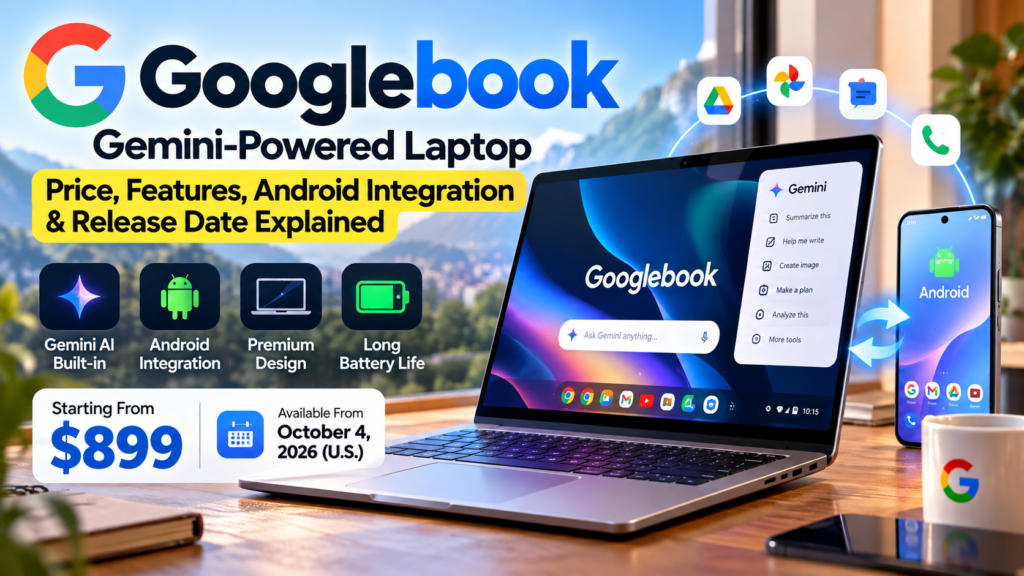
The first laptops are now available for pre-order, prices start at $899, and Google has partnered with Acer, ASUS, Dell, HP and Lenovo for the initial lineup. The devices combine an Android technology stack with desktop foundations from ChromeOS, while Gemini is built much deeper into the experience than on a normal laptop. blog.google
This is also not a single Google-made laptop in the way the old Pixelbook was.
Googlebook is a new laptop category, with different manufacturers building their own versions around the same Google software experience.
That distinction matters because the hardware can vary quite a bit depending on which model you choose.
What Exactly Is a Googlebook?
The easiest way to understand Googlebook is to stop thinking of it as “another Chromebook.”
Google says Googlebook is built on the Android technology stack, while borrowing desktop foundations from ChromeOS. The goal is to give users a full desktop browser, Android apps, stronger phone integration and Gemini features that are designed directly into the laptop experience.
That makes it a different product category from the traditional Chromebook.
Chromebooks are still focused heavily on simplicity, web apps and everyday computing. Googlebook moves higher up the market with premium materials, more powerful processors, at least 16GB of RAM and AI tools that are meant to become part of normal day-to-day work.
The most obvious target is someone who already lives inside Google’s ecosystem and uses an Android phone.
Googlebook Price
The Googlebook lineup starts at $899 in the United States.
That alone tells you Google is not trying to compete with the cheapest Chromebooks.
The first models are positioned as premium laptops, and different manufacturers will offer different display sizes, processors and designs.
Google has announced five launch partners:
Acer, ASUS, Dell, HP and Lenovo.
The Acer model is the convertible option, ASUS is focused on portability, Lenovo has a larger productivity-oriented design, while Dell and HP sit in the more traditional premium-laptop space.
Pricing above the $899 starting point will depend on the exact model and configuration.
When Does Googlebook Go on Sale?
Pre-orders are already open.
Google says the first Googlebooks will reach stores on October 4, 2026 in the United States.
They arrive on October 5 in Canada, the United Kingdom, Ireland, France, Germany and Australia.
India is not included in that first list of markets.
So if you are waiting for a Googlebook India launch, there is no officially announced India release date or India price yet.
That may change later, but for now it would be inaccurate to simply convert $899 into rupees and call it the Indian price.
This Is Really an Android Laptop Ecosystem Play
One of the most interesting parts of Googlebook is not the processor or display.
It is what happens when you sign in with the same Google account you already use on an Android phone.
Google says your saved passwords, Wi-Fi networks, settings and messages can move over during setup, with end-to-end encryption used for the transfer.
After that, the laptop and phone are designed to stay connected.
A feature called Continue On lets you start something on your phone and pick it up from the Googlebook taskbar.
The Files app can also access files and photos from your phone directly, so you do not have to keep sending things to yourself by email.
Then there is Cast My Apps, which lets you interact with phone apps inside a desktop window on the laptop.
For an Android user, this may end up being more valuable than some of the AI features.
Apple has spent years making iPhone and Mac work well together. Google is clearly trying to build a similar kind of continuity for Android users.
Magic Pointer Is Gemini Built Into the Cursor
One of Googlebook’s headline AI features is called Magic Pointer.
The idea is simple.
Instead of opening Gemini in a separate window, you can wiggle the cursor and bring Gemini directly to whatever you are already looking at.
Google says Magic Pointer understands text, images and on-screen context.
For example, you could point at a complicated schedule and ask Gemini to put the events into Google Calendar.
You could hover over a suspicious email and ask whether it looks legitimate.
Or you could select several images and ask Gemini to work with them together without first downloading and uploading everything manually.
That is a much more interesting implementation than simply placing another AI button in the taskbar.
The useful part is not that Gemini exists.
It is that Google is trying to reduce the number of steps between seeing something on your screen and asking AI to do something with it.
Rambler Is Voice Dictation That Cleans Up What You Say
Normal dictation can be frustrating.
It writes down the pauses, repeated words and half-finished thoughts along with everything else.
Googlebook’s Rambler takes a different approach.
You speak naturally, and Gemini tries to turn that speech into structured writing.
Google says Rambler can clean up mistakes, separate action items, create headings and format a messy spoken thought into something easier to share. It also supports switching between languages in the same dictation session.
This could be useful for meeting notes, brainstorming or drafting an email when you know what you want to say but do not want to type everything from scratch.
Whether people prefer this over a keyboard will depend on the situation, but it feels like one of the more practical AI additions.
Create My Widget Is a Different Kind of AI Feature
Another feature is Create My Widget.
You describe the widget you want in normal language, and Googlebook generates it without requiring you to write code.
For example, you could create a simple widget that tracks a sports score, shows a countdown to an event or surfaces information you check regularly.
This is interesting because it moves generative AI away from simply writing text or making images.
Instead, the AI is building a small piece of the computer interface around what you want.
For most users, the best widgets will probably be simple ones.
Developers can go further using Google’s Antigravity tools and the built-in Linux environment.
Gemini Can Keep Working After You Close the Laptop
Google is also pushing more agent-style features.
Googlebook includes familiar Gemini capabilities such as Gemini Live, task automation and proactive suggestions based on what is on screen.
Google says Gemini Spark can even continue processing some complex tasks in the background after the laptop lid is closed.
That is the direction Google clearly wants to move toward: less “ask a chatbot a question,” and more “give the computer a task and let it finish the work.”
How useful that feels will depend heavily on reliability.
If an automated task works correctly almost every time, people may use it constantly.
If users have to check every result carefully, the time savings become much smaller.
Googlebook Hardware Is Much More Premium Than a Typical Chromebook
Google has set a fairly high hardware baseline.
Every Googlebook starts with at least 16GB of RAM, with some configurations going up to 32GB.
Displays can go up to 2.8K OLED, and the lineup includes touchscreens, backlit keyboards and large haptic trackpads. Google is also using premium materials such as aluminium, magnesium alloy and carbon fibre depending on the model.
That alone makes the category feel very different from the budget Chromebook reputation.
The goal appears to be a laptop you would compare with a MacBook, premium Windows ultrabook or high-end productivity laptop rather than a low-cost school device.
Intel and Snapdragon Options Are Available
At launch, Googlebook models use processors from Intel and Qualcomm.
Google lists Intel Core Ultra Series 3 and Qualcomm Snapdragon X Elite among the launch options.
These processors are paired with NPUs capable of more than 45 TOPS of on-device AI performance.
That matters because some Gemini-related tasks can run directly on the laptop rather than always depending on a cloud connection.
Google has also worked with MediaTek on the broader platform, although the first launch lineup highlighted by Google is centred on Intel and Snapdragon configurations.
Battery Life Could Vary Quite a Bit Between Models
Google quotes up to 14 hours of video playback and up to 16 hours of web browsing across the platform.
Individual models can differ.
Google’s store currently shows different battery claims depending on the specific manufacturer and processor, so buyers should check the exact model rather than assuming every Googlebook will deliver the same runtime.
This is especially important with laptops because display type, processor choice and battery size can significantly change real-world endurance.
The Glowbar Is Back
Google has also revived a small design idea from its older premium laptops.
The Glowbar sits on the outside of the computer and lights up during startup.
It can also show charging progress and react visually when you interact with Gemini.
Google is opening the Glowbar to developers as well, which means apps may eventually be able to create their own animations.
It is not a reason to buy the laptop on its own, but it gives the Googlebook line a recognisable visual identity.
You Get Android Apps, Full Chrome and Linux Tools
Googlebook is not limited to web apps.
Google says it combines the desktop-class Chrome browser and extensions with access to millions of Android apps through Google Play.
That includes creative tools such as Adobe Photoshop, Lightroom and CapCut.
Microsoft 365 files can also be opened, edited and saved through the Microsoft 365 app. Google Store
For developers, Googlebook includes a Linux environment with full terminal access.
Google specifically mentions tools such as Claude Code and Antigravity CLI.
That makes the machine far more capable than the old stereotype of a Chromebook that only runs browser tabs.
Still, users who rely on a particular Windows or macOS desktop app should check compatibility before switching.
Having many Android apps does not automatically mean every professional desktop workflow has an equivalent.
Gaming Is Mostly Android and Cloud-Based
Googlebook users can run Android games from the Play Store.
Google also includes access to PC games through cloud services.
Every Googlebook purchase includes a complimentary year of GeForce NOW, according to Google.
That can open access to much more demanding games without requiring a dedicated gaming GPU in the laptop.
But cloud gaming still depends heavily on your internet connection.
Latency, connection stability and data limits matter far more than they would with a locally installed game.
So Googlebook should not automatically be treated as a gaming-laptop replacement just because it can stream AAA titles.
Security Is Borrowed From ChromeOS
Googlebook uses security ideas that Google has already developed through ChromeOS.
The company says the platform includes the Google Titan hardware root of trust, layered security and on-device malware detection.
There is also an isolated Linux environment built around what Google describes as a Level 5 security-certified pKVM hypervisor.
For most everyday buyers, the technical name matters less than what it is trying to achieve.
The Linux environment used for development is separated from the rest of the system, reducing the risk that something running there affects personal data elsewhere on the laptop.
Googlebook vs Chromebook: What Is Actually Different?
This is probably the most important question.
A Chromebook remains the simpler option.
ChromeOS is still built around fast web access, straightforward management and relatively lightweight computing.
Googlebook is targeting someone who wants more.
Google describes the difference as a combination of premium hardware, deeper Android phone integration, stronger performance and Gemini intelligence built into the desktop experience.
In practice, the biggest differences are likely to be the hardware baseline and cross-device experience.
A Googlebook begins with 16GB RAM and modern Intel or Snapdragon processors.
It is also designed around continuing tasks between an Android phone and laptop, streaming phone apps and accessing phone files directly.
That is a much stronger ecosystem focus than what most Chromebooks have offered.
Is Googlebook Replacing Chromebook?
No.
Google has not announced that Chromebooks are going away.
The two categories are aimed at different users.
Chromebooks still make sense for education, basic productivity and lower-cost computing.
Googlebook is a more premium category aimed at creators, developers, professionals and Android users who want something closer to a flagship laptop.
Reuters also describes Googlebook as an extension of Google’s laptop strategy into more powerful, premium hardware rather than simply another budget Chromebook. Reuters
Every Googlebook Comes With Google AI Pro
Google is bundling a fairly large software package with the first devices.
Every Googlebook includes 12 months of Google AI Pro, which Google says provides 5TB of cloud storage and higher Gemini usage limits.
The bundle also includes three months of YouTube Premium, Adobe Photoshop and additional offers.
That adds value to the first-year package, but buyers should remember that subscriptions can become paid services after the included period ends.
It is better to treat those extras as launch benefits rather than part of the laptop’s permanent value.
Google Promises Up to 10 Years of Updates
One of the strongest long-term points is software support.
Google says Googlebook OS will receive regular feature drops and updates for up to 10 years.
That matters for a laptop starting at $899.
If someone plans to keep the machine for five or six years, long software support is much more valuable than another small specification advantage.
Of course, “up to 10 years” is not the same as saying every piece of hardware will feel fast for a decade.
But knowing that the operating system will continue receiving updates removes one major concern.
Should Windows Users Switch?
That depends almost entirely on your workflow.
If most of your day happens in Chrome, Google Docs, Gmail, web apps, Android apps and cloud services, Googlebook could be easy to adapt to.
It becomes more complicated if you depend on specialist Windows software.
Examples might include certain engineering applications, enterprise software, specific desktop plugins or advanced PC gaming setups.
Googlebook has Linux support, Android apps and a strong browser environment, but it is not Windows.
That sounds obvious, yet it is probably the most important thing to check before buying one.
What About MacBook Users?
Google is clearly making a similar ecosystem argument to Apple.
If you use an iPhone, a Mac becomes more convenient because your phone and computer understand each other.
Googlebook is trying to create that feeling for Android users.
The difference is that Google is not relying on one hardware manufacturer.
You can choose a laptop from Acer, ASUS, Dell, HP or Lenovo and still get the Googlebook software experience. blog.google
That gives buyers more choice in screen size and form factor.
It can also make the lineup more confusing because there is no single “Googlebook specification” beyond the platform requirements.
Who Is Googlebook Actually For?
Googlebook looks most interesting for people who already use Android and Google services heavily.
A Pixel, Samsung, OnePlus or other Android phone paired with Googlebook should benefit from the cross-device features in a way a random Windows laptop does not.
It also looks relevant for developers and creators because Google is including Linux tools, Android apps and stronger hardware.
But someone who only needs a laptop for browsing, email and basic documents may not need to spend $899.
A normal Chromebook could still handle that job for much less.
Is Googlebook Worth $899?
The starting price is aggressive compared with Chromebooks, but not unusual for a premium laptop.
The value question really comes down to whether the Gemini and Android integration save you enough time to matter.
The hardware is not weak.
You are getting at least 16GB RAM, modern processors, premium materials and long software support. blog.google
What still needs real-world testing is the software experience.
Features like Magic Pointer and Rambler sound useful in demonstrations.
The important test is whether they become tools people actually use after six months rather than features they try during the first week.
Googlebook India Launch: What We Know
Right now, Google has not announced Googlebook availability in India.
The first confirmed markets are the United States, Canada, the UK, Ireland, France, Germany and Australia. blog.google
That means there is no official Googlebook India price yet either.
Indian buyers should wait for a Google announcement rather than relying on converted US pricing.
A $899 laptop will not necessarily cost the direct dollar-to-rupee equivalent once taxes, local configurations and pricing strategy are included.
What Googlebook Could Mean for the Laptop Market
The most interesting part of Googlebook may not be the current five models.
It is what the platform represents.
For years, Google had Android phones on one side and Chromebooks on the other.
They worked together, but they never felt as tightly connected as Apple’s devices.
Googlebook is an attempt to fix that by treating the laptop as another part of the Android ecosystem.
If it works, Android users finally get a premium laptop platform designed around their phones from the beginning.
If it does not, Googlebook could end up being remembered as another premium ChromeOS experiment, similar to the Pixelbook.
The first generation has to prove that deeper Gemini integration is genuinely useful and that users are willing to leave familiar Windows or macOS workflows for it.
Final Thoughts
Googlebook is more interesting than its name initially suggests.
It is not simply a Chromebook with better specifications, and it is not just a laptop with Gemini pre-installed.
Google is trying to redesign the relationship between an Android phone and a computer.
Features such as Continue On, Cast My Apps and direct phone-file access may end up being the most important parts of that idea. Magic Pointer, Rambler and custom AI widgets add another layer on top.
The hardware also looks serious enough to compete in the premium laptop market, with a 16GB RAM baseline, OLED display options, Intel and Snapdragon processors and long software support.
But the starting price of $899 means Googlebook has to compete with very good Windows laptops and MacBooks, not cheap Chromebooks.
That makes the first few months important.
If the Android integration feels seamless and Gemini genuinely removes repetitive work, Google may finally have a compelling premium laptop ecosystem.
If those features feel optional, buyers will probably compare Googlebook the same way they compare every other laptop: screen, battery, performance and price.
The first devices go on sale in the U.S. on October 4, with additional countries following on October 5. India availability has not yet been announced.
Frequently Asked Questions
What is a Googlebook?
Googlebook is Google’s new premium laptop category designed around Gemini Intelligence and deep Android-phone integration. It combines an Android technology stack with desktop foundations from ChromeOS.
How much does a Googlebook cost?
Googlebook laptops start at $899 in the United States. Prices vary depending on the manufacturer and configuration.
When is Googlebook being released?
Googlebook reaches stores on October 4, 2026 in the U.S. and October 5 in Canada, the UK, Ireland, France, Germany and Australia. blog.google
Is Googlebook available in India?
Not yet. Google has not announced an India launch date or official Indian pricing as of September 25, 2026.
Which processors are available?
Launch configurations include Intel Core Ultra Series 3 and Qualcomm Snapdragon X Elite processors.
How much RAM does Googlebook have?
Every Googlebook starts with at least 16GB RAM, while some models offer up to 32GB.
What is Magic Pointer?
Magic Pointer lets you bring Gemini directly to content on your screen by wiggling the cursor, then ask it to work with text, images or other visible information.
Can Googlebook run Android apps?
Yes. Googlebook supports Android apps through Google Play alongside the desktop Chrome browser and extensions.
Is Googlebook replacing Chromebook?
Google has not announced that Chromebooks are being discontinued. Googlebook is positioned as a separate premium category with stronger hardware, Gemini integration and deeper Android connectivity. Google Store
How long will Googlebook receive updates?
Google says Googlebook OS will receive updates and regular feature drops for up to 10 years.
Disclaimer
This article is based on Google’s official Googlebook announcements and product information available as of September 25, 2026. Prices, models, bundled subscriptions, software features and regional availability may change over time. Check Google’s official product pages or the manufacturer’s website before purchasing.
Official Sources
Google — Googlebook Pre-Order Announcement
Official information on pricing, Android integration, software, launch countries and bundled subscriptions. blog.google
Google — Googlebook Built-In Intelligence
Official details about Magic Pointer, Rambler, Create My Widget and other Gemini features. blog.google
Google — Googlebook Hardware Overview
Official information about the five launch models, displays, processors, RAM, battery life and materials. blog.google
Google Store — Googlebook
Official comparison information and explanation of how Googlebook differs from Chromebook. Google Store
Last Updated: September 25, 2026