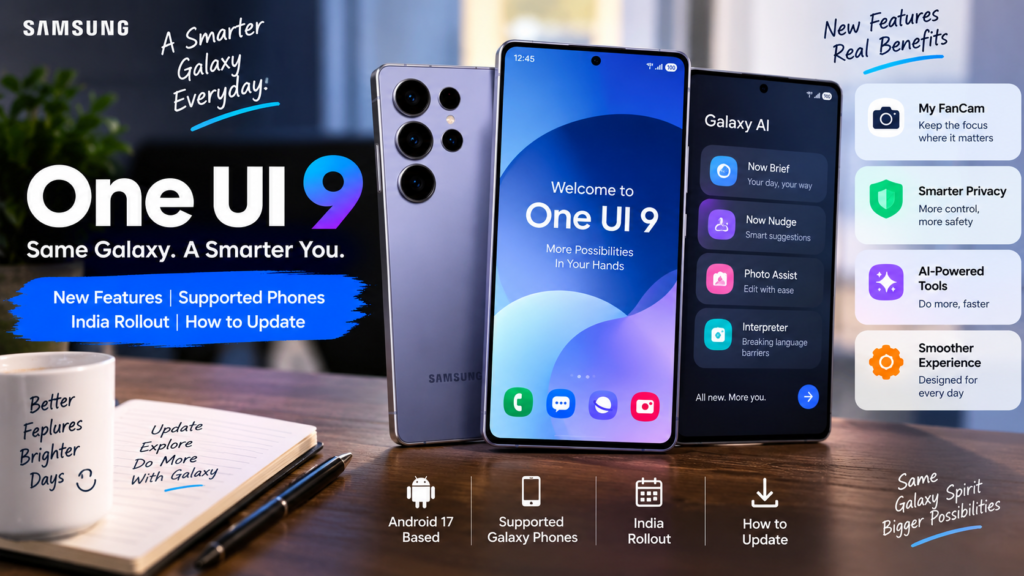
Samsung has officially started rolling out One UI 9, and if you use a Galaxy phone, this is one update worth watching.
The stable rollout began on September 16 with the Galaxy S26, Galaxy S26+ and Galaxy S26 Ultra. One UI 9 had already debuted on newer foldable models including the Galaxy Z Fold8 Ultra, Galaxy Z Fold8 and Galaxy Z Flip8.
The update is based on Android 17 and brings changes across Galaxy AI, privacy, camera tools, device care, translation and daily-use features. Samsung had already confirmed Android 17 during the One UI 9 beta launch earlier this year.
For users in India, the good news is that India was part of the One UI 9 beta program, so Indian Galaxy users are clearly included in Samsung’s rollout plans. The exact timing, however, can still vary by device and region.
What Is One UI 9?
One UI 9 is Samsung’s latest software interface for Galaxy phones and tablets.
You are still using Android underneath, but Samsung adds its own design, apps, settings, AI features and customization on top of it.
This version is built on Android 17 and continues Samsung’s push toward a more personalized Galaxy experience.
The update is not just about changing icons or menus.
Most of the interesting changes are around practical features that can save time in everyday use.
Which Galaxy Phones Are Getting One UI 9 First?
Samsung’s stable rollout started with:
- Galaxy S26
- Galaxy S26+
- Galaxy S26 Ultra
Samsung also says One UI 9 had already launched on:
- Galaxy Z Fold8 Ultra
- Galaxy Z Fold8
- Galaxy Z Flip8
The update will gradually expand to more Galaxy devices.
Samsung has also expanded the One UI 9 beta program to older premium devices, including:
- Galaxy S25
- Galaxy S25+
- Galaxy S25 Ultra
- Galaxy S25 FE
- Galaxy Z Fold7
- Galaxy Z Flip7
That beta expansion included India.
One thing to keep in mind: beta eligibility does not always mean the stable update will arrive on the exact same date.
One UI 9 India Rollout
India has been part of the One UI 9 program since the beta stage.
Samsung included India in the first Galaxy S26 beta rollout and later expanded the beta to more devices.
The stable update is being released in phases.
So if your phone does not show One UI 9 yet, that does not automatically mean your device is unsupported.
Samsung says update timing can vary based on device model, country and network operator.
The easiest way to check is:
Settings → Software update → Download and install
Samsung also lists slightly different menu paths on some devices, but the Software Update section is the main place to look.
My FanCam Is One of the Most Interesting New Features
One of the more practical additions in One UI 9 is My FanCam.
This feature lets you select a person in a recorded video and automatically keeps that person centered as the scene moves.
Samsung says the phone can intelligently reframe the video so the selected person stays in focus.
Think of situations like:
- School performances
- Dance videos
- Sports events
- Family functions
- Concert clips
Instead of manually cropping every part of the video later, the phone can do much of that work for you.
For people who create social media content, this may actually be more useful than another small visual design change.
Now Brief Is More Customizable
Samsung is also improving Now Brief.
One UI 9 adds generative and editable cards so users have more control over what appears in their daily summary.
Samsung says these cards can include areas such as weather, health and video content.
The idea is simple:
Instead of showing the same type of information to everyone, the brief can become more personal.
How useful this feels will probably depend on how often you already use Now Brief.
Now Nudge Tries to Help Before You Ask
Another major feature is Now Nudge.
This feature looks at what you are doing and may suggest the next useful action.
Samsung gives an example where you are making plans in a message. Now Nudge may surface reservation details or help you save a shared location without leaving the conversation.
That sounds small, but reducing app switching can make a phone feel faster in daily use.
The real test will be whether the suggestions are actually relevant.
A smart suggestion is useful.
A random suggestion is just another notification.
Warranty and Care Is Moving Into Settings
This is not the most exciting feature, but it may be one of the most practical.
One UI 9 adds Warranty and Care inside Settings.
Samsung says users can check warranty information, run diagnostics, see repair estimates and manage Samsung Care+ options from one place.
For normal users, this is useful because warranty and service information is often harder to find than it should be.
Now it is closer to the device itself.
Interpreter Gets Easier to Follow
Samsung’s Interpreter feature is also getting an upgrade.
One UI 9 introduces a Thread View, which helps users look back at earlier parts of a translated conversation.
Samsung also says translation in Conversation Mode is faster, with quicker playback on compatible Galaxy Buds.
This may be useful for travel, work meetings or conversations where both people are speaking different languages.
Document Scan Gets Better
Samsung has also improved document scanning.
One UI 9 can better handle difficult documents such as:
- Curved book pages
- Folded paper corners
- Documents that are not perfectly flat
Samsung says the updated scanner can reduce the need for manual adjustment and includes an improved Finger Eraser.
This is the kind of feature students and office users may appreciate more than a flashy AI demo.
Voice Recorder Summaries Are Cleaner
Voice Recorder can now present summaries in a more structured way.
Instead of showing one long block of text, Samsung says summaries can use headings and tables to make important information easier to scan.
If you record meetings, lectures or interviews, this can make reviewing notes faster.
Privacy and Security Are a Bigger Focus
Samsung has added several privacy-focused changes in One UI 9.
Security Brief
Security Brief brings important security warnings into Now Brief.
This can include things like:
- Malware alerts
- Apps from unknown sources
- Unnecessary permissions
The goal is to make security problems easier to notice before they become bigger issues.
Privacy Alerts
Privacy Alerts use on-device AI to identify possible privacy risks.
For example, if an app is trying to access permissions in the background when it may not need to, the phone can warn you.
Samsung also lists several older Galaxy models as supporting Privacy Alerts, including devices from the S23, S24, S25 and Fold/Flip families.
Scam Detection Is Expanding to India
This is especially relevant for Indian users.
Samsung says Scam Detection will be available in India, along with Canada and Japan.
That can help warn users about potentially suspicious calls.
No scam-detection system is perfect, so basic safety still matters:
Never share OTPs, passwords, banking PINs or card details with unknown callers.
But having another layer of warning on the phone is still useful.
Quick Panel Is More Flexible
The One UI 9 beta also introduced more customization for the Quick Panel.
Samsung says brightness, sound and media controls can be adjusted more independently, with more size and layout options.
If you like setting up your phone exactly the way you want, this is one of the changes you may notice quickly.
Samsung Notes Gets Small but Useful Improvements
Samsung Notes is getting a few creative additions too.
The beta introduced decorative tapes and more pen-line styles.
These are not major features, but people who use Samsung Notes every day may enjoy the extra options.
Will One UI 9 Improve Battery Life?
Samsung has not promised that One UI 9 will automatically improve battery life on every Galaxy phone.
That is important to understand.
After a major update, battery use can sometimes feel higher for a day or two because the phone may be:
- Re-indexing files
- Updating apps
- Rebuilding system caches
- Running background optimization
So if battery life looks slightly worse immediately after the update, give the phone some time.
If the problem continues for several days, then check Battery settings and app usage.
Will One UI 9 Make an Older Phone Faster?
Not necessarily.
Software updates can improve animations and system behavior, but they cannot change the limits of older hardware.
The main reasons to update are:
- Android 17
- New Samsung features
- Security improvements
- Better privacy controls
- Galaxy AI enhancements
Do not install it expecting a huge performance jump on every device.
How to Check for One UI 9
Samsung’s official update process is simple.
Go to:
Settings → Software update → Download and install
On some devices, Samsung may show slightly different wording such as “Check for updates.”
If an update is available, follow the instructions on screen.
Your device will restart during the update process.
What to Do Before Installing
Before installing a major system update, a few basic steps are worth doing.
Back up important data
Photos, documents and contacts should always have a backup.
Use Wi-Fi
The update can be large.
Charge your phone
Do not start a major update with a nearly empty battery.
Do not update in the middle of important work
Install when you have enough time in case the phone needs to restart or finish background setup.
These are simple steps, but they can save a lot of trouble.
What If One UI 9 Is Not Showing?
Do not download random firmware files from unknown websites.
Samsung releases updates in phases.
The update can arrive at different times depending on:
- Device model
- Country
- Carrier
- Firmware build
Samsung itself says schedules can change and updates may even be paused temporarily if issues are found.
So if your phone is supported but the update is not showing yet, waiting is usually the safer option.
Should You Install One UI 9 Immediately?
For most users, installing the stable update should be fine once it becomes available.
But if your phone is very important for work or business, waiting a few days is reasonable.
Major updates sometimes bring early bugs such as:
- Battery drain
- App compatibility issues
- Network problems
- Small UI glitches
A short wait gives you time to see whether users with the same model are reporting serious issues.
Final Thoughts
One UI 9 feels more useful than a simple visual update.
Samsung is clearly focusing on making Galaxy phones more context-aware, more private and easier to manage.
Features like My FanCam, Now Nudge, Privacy Alerts, Warranty and Care, Interpreter improvements and Scam Detection all solve fairly practical problems.
The rollout has started with the Galaxy S26 family and will gradually expand to more devices. India is already part of Samsung’s One UI 9 program, but exact timing will still depend on the device.
If the update does not appear on your Galaxy phone immediately, there is no reason to panic.
Check the Software Update section, keep an eye on Samsung Members and wait for the official build for your device.
That is much safer than installing unofficial firmware just to get the update a few days earlier.
Frequently Asked Questions
Is Samsung One UI 9 based on Android 17?
Yes. Samsung officially confirmed that One UI 9 is built on Android 17.
When did the One UI 9 stable rollout start?
Samsung started the stable rollout on September 16, 2026, beginning with the Galaxy S26 series.
Is One UI 9 available in India?
India was included in Samsung’s One UI 9 beta program. Stable availability depends on the device model and phased rollout schedule.
Which Galaxy phones have One UI 9 already?
Samsung says One UI 9 debuted on the Galaxy Z Fold8 Ultra, Galaxy Z Fold8 and Galaxy Z Flip8, while the wider rollout started with the Galaxy S26 series.
How do I check for One UI 9?
Open Settings → Software update → Download and install.
Why is One UI 9 not showing on my phone?
Samsung uses a phased rollout, so availability can vary by country, network operator and device model.
Will One UI 9 improve battery life?
There is no guarantee for every phone. Battery behavior can vary by device and may temporarily change after a major software update.
Disclaimer
This article is for informational purposes only. One UI 9 features, device compatibility and rollout timing may vary by country, carrier and Galaxy model. Samsung may also change rollout schedules or feature availability. Always check Samsung’s official support pages or the Software Update section on your device for the latest information.
Official Sources
Samsung Global Newsroom — One UI 9 Official Rollout
Official details about the rollout and major new features.
Samsung Newsroom India — One UI 9 Beta
Official confirmation of Android 17 and India beta availability.
Samsung Newsroom UK — Expanded One UI 9 Beta Program
Official list of additional devices included in the beta expansion.
Samsung India Support — How to Update a Galaxy Phone
Official instructions for checking and installing software updates.
Last Updated: September 21, 2026